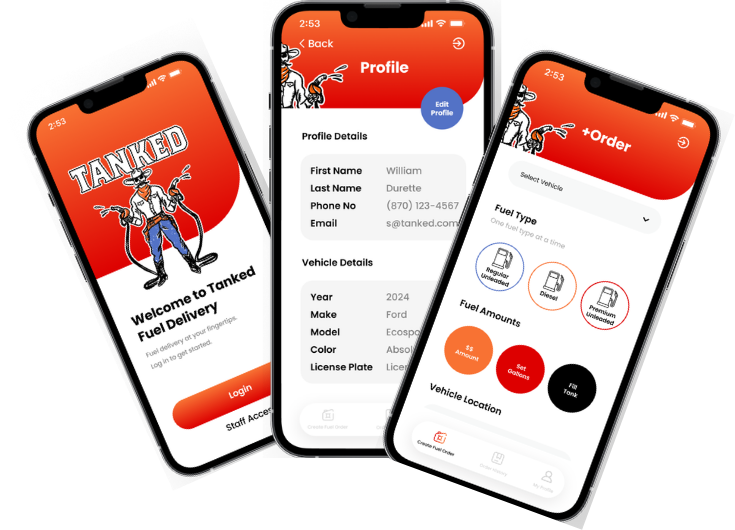
If you have never used mobile fuel delivery before, the biggest question is probably: “What do I actually have to do?” The answer is not much.
Tanked Houston is designed to feel as easy as ordering any other service from your phone. You create your account, save your vehicle information, request fuel and choose a location and requested time. We use the information in your account to find the right vehicle, keep you updated as we arrive, fuel it, and complete payment through the app. You do not have to stand beside the car or wait around for us. In many cases, you can be inside your home, at your desk, watching a game or taking care of the rest of your day while your vehicle gets fueled outside.
STEPS ON HOW IT WORKS
Step 1
Add Your Vehicle
Start by downloading the Tanked app and creating your account. Add the year, make, model and license plate of the vehicle you want us to service. That information helps us quickly identify the right vehicle when we arrive.
If you have more than one vehicle attached to the account, simply choose the one that needs fuel when you place the request.
Step 2
Tell Us What You Need
Choose the amount you want based on the options available in the app. You may be able to request a dollar amount, a gallon amount or a fill-up. Tanked Houston delivers regular unleaded, premium gasoline and clear diesel.
Need fuel for something other than a typical passenger vehicle? We can also help with many generators, RVs, boats, motorcycles, fleet vehicles and other gasoline- or clear-diesel-powered equipment. For larger or unusual requests, reach out first so we can make sure the location, fuel type and quantity are a good fit.
STEP 3
Pick a Location and Time
One of the best parts of mobile fueling is that your vehicle can often be serviced where it is already parked. That might be your driveway, workplace, school, sports facility or another permitted location.
Whenever possible, please schedule at least one day ahead. Same-day service may be available when our route and schedule allow, but it is not guaranteed. If you can plan ahead, we can plan the route more efficiently and give you the smoothest experience.
Step 4
Keep an Eye on the Notifications
Once your order is accepted, you can receive updates as Tanked Houston heads your way, arrives and finishes the delivery. You do not have to wonder whether we have shown up or whether your vehicle is done.
That is the point of the service: your fuel stop should fit quietly into your day instead of becoming the center of it.
Step 5
We Fuel the Vehicle and Complete Payment
After the fill-up, Tanked Houston enters the gallons delivered and the fuel price. Your stored payment method is charged through the service.
The process is designed to be contactless, so you generally do not need to meet us with a credit card or sign anything at the vehicle.